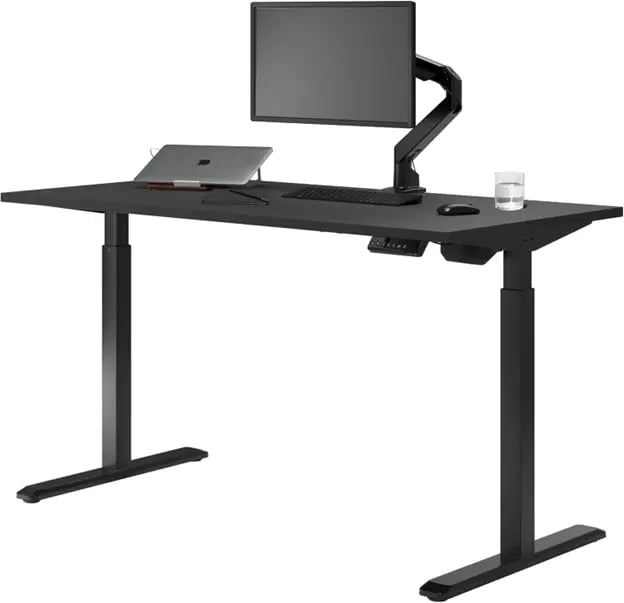
Quick Verdict
- Winner: Desky Dual Sit Stand Desk
- Why it wins: Native Siri voice control, full-featured mobile app, and integrated cable and power management included by default
- Best for: California WFH professionals who want a smart, camera-ready home office desk within an iPhone ecosystem
- Where Uplift leads: Broader desktop customization and higher maximum weight capacity
California home office professionals need more than a desk that moves up and down. They need a workspace that integrates with an existing tech setup, keeps cables hidden during video calls, and stays steady under a full multi-monitor load.
We compared Desky and Uplift across voice and app control, cable and power management, motor noise, stability, and total value for a California remote worker. The Desky Dual Sit Stand Desk comes out ahead. Here is the full breakdown.
At a Glance: Desky Dual vs UPLIFT V3
| Feature | Desky Dual Sit Stand Desk | UPLIFT V3 Standing Desk |
| Mobile App | Yes | Yes |
| Siri Voice Control | Yes | No |
| Sit-Stand Reminders | Yes | Yes |
| Usage Tracking | Yes | No |
| Integrated Power Board | Up to 9 outlets (optional) | No (add-on required) |
| Built-In Cable Channel | Yes | Tray only (add-on required) |
| Motor Noise | ~40 dB | ~48 dB |
| Load Capacity | 140 kg / 308 lbs | 161 kg / 355 lbs |
| Desktop Material Options | Hardwood, bamboo, softwood, laminate | Wide variety |
| Starting Price | Competitive | Higher entry point |
Desky Dual Sit Stand Desk: Best Smart Desk for Home Office
Desky builds smart features into the Dual Sit Stand Desk from the ground up, not as an optional extra. California remote workers who want their desk inside an Apple ecosystem get native Siri voice control and a full companion app without purchasing additional hardware.
TechRadar gave the Desky Dual its “highly recommended” rating, calling it a voice-controlled workplace essential and one of the strongest third-party endorsements any standing desk has earned in this category. [1]
Smart App and Siri Voice Control
Desky connects the Dual to a dedicated mobile app that covers height presets, sit-stand scheduling, and daily usage tracking. Siri voice commands let you adjust desk height mid-call without touching a button. You can save multiple height presets, so switching between sitting and standing stays completely hands-free throughout the day.
Built-In Cable and Power Management
Desky routes cables through purpose-designed under-desk channels built directly into the frame, keeping them clean as the desk adjusts. An optional integrated power board adds up to 9 outlets and USB ports, all mounted underneath, so the desktop stays clear at any height.
Most competitors leave California home office professionals managing cables with third-party clip-on kits, a visible problem on video calls. Desky solves this by routing every wire through frame-integrated channels that stay tidy at any desk height. The result is a camera-ready background that requires no post-setup work.
This clean-cable approach earned Desky a spot on CNN Underscored's list of best cable management solutions [2], a recognition that reflects real editorial scrutiny, not just marketing copy.
Quiet Dual Motor and Stability
The Desky Dual runs at approximately 40 dB during height adjustment, which sits below the standard microphone pickup range. You can transition from sitting to standing mid-call without the motor registering on audio. The heavy-duty steel frame supports up to 140 kg, covering dual monitors, a desktop tower, and peripherals with minimal wobble at standing height.
Desktop Options
Desky produces the Dual in multiple finishes, including softwood, bamboo, laminate, and hardwood. The hardwood edition is the top seller, and it sits at a competitive price relative to other hardwood standing desks on the market. Desktop material is a personal preference. The smart desk features run identically across every finish.
Pros:
- Native Siri voice control and mobile app with usage tracking
- Integrated cable channels and an optional 9-outlet power board
- Quiet 40 dB dual motor stays off the microphone during video calls
- Hardwood desktop available at a competitive price point
Cons:
- Online-only purchase with no California showroom for hands-on testing
- Frame warranty is shorter than some premium competitors
Best for: California WFH professionals who want voice-controlled height adjustment, clean cable management, and a camera-ready workspace without add-ons.
Watch the Desky Dual in action: https://www.youtube.com/watch?v=gKYvPxktBdg
Explore the full Desky Dual range at desky.com.
Contact Details:
Address: 500 Red Stag Way, Sweetwater, TN 37874, USA
Phone: +1 800 696 9017
Email: help@desky.com
Website: desky.com
LinkedIn: linkedin.com/company/deskydesk
Instagram: @deskyau
Facebook: facebook.com/deskyaus
UPLIFT V3 Standing Desk
UPLIFT builds the V3 around desktop variety and heavy-duty load capacity. California buyers who want a wide selection of surface materials and a higher weight limit will find a well-made desk here, though the smart feature set falls short of Desky on several key points.
App and Smart Controls
UPLIFT offers a companion app for sit-stand reminders and basic height control. The app does not collect or store any usage data, so you get scheduling but no habit tracking over time. Voice assistant integration is not available. Height adjustment runs through a physical keypad with one-touch preset recall.
Cable Management
UPLIFT ships the V3 with a FlexMount cable manager tray. Achieving a fully clean desk setup typically requires additional cable kits, wire grommets, and a separately purchased surge strip. For home offices where cable appearance on camera matters, this setup demands more planning and additional costs.
Motor and Stability
The V3 runs two motors at approximately 48 dB during height adjustment, which is audible in a quiet home office. Load capacity is a genuine strength at 355 lbs, exceeding the Desky Dual and suitable for unusually heavy professional gear. The frame is well-built and stable at standing height.
Pros:
- High weight capacity (355 lbs) for heavy professional setups
- Wide range of desktop materials and size options
- Solid frame build with strong warranty coverage
Cons:
- No voice assistant integration (Siri or Google Assistant)
- App does not track or log desk usage habits
- Fully clean cable management requires additional purchases
Best for: Home office users who prioritize maximum weight capacity and broad desktop selection over smart voice controls.
Contact Details:
Address: 1848 Ferguson Ln, Building 1, Austin, TX 78754
Phone: (800) 349-3839
Email: hello@upliftdesk.com
Website: upliftdesk.com
LinkedIn: linkedin.com/company/uplift-desk
Instagram: @upliftdesk
Facebook: facebook.com/UPLIFTDesk1
Which Desk Wins for the California Home Office?
The Desky Dual Sit Stand Desk wins this comparison for most California home office professionals. Siri voice control, a usage-tracking mobile app, built-in cable channels, and an optional integrated power board deliver a smarter, cleaner workspace out of the box.
UPLIFT V3 holds a real edge on weight capacity and desktop variety. But for a WFH professional who runs client calls daily and wants a tidy background at every desk height, those advantages rarely close the smart feature gap. Desky Dual is the stronger pick.
Red Flags When Choosing a Smart Standing Desk
Buyers should watch for these warning signs before committing to any standing desk.
- Cable management is sold separately. Desks that require third-party trays and kits add hidden cost. Look for cable channels built directly into the frame.
- Voice control is tied to a separate hub. A desk with native Siri or Google Assistant support needs no extra devices. Beware setups that require an additional smart home hub to work.
- No usage tracking in the app. Sit-stand reminders are useful, but apps that do not log habits leave you with no data to improve your ergonomics over time.
- Motor noise above 45 dB. Desk adjustments above 45 dB can be recorded by microphones. Always check the motor spec before buying.
Frequently Asked Questions
What should a smart standing desk include for a home office?
A smart standing desk for home office use should have mobile app control with usage tracking, native voice assistant support, built-in cable management that moves with the desk, and a dual motor quiet enough to operate during video calls.
Can you control a standing desk with Siri?
The Desky Dual Sit Stand Desk supports Siri voice commands natively through its mobile app. You issue a voice command, and the desk adjusts hands-free, with no hub or third-party device required.
Does the Uplift desk have a mobile app?
UPLIFT offers a companion app for sit-stand reminders and basic height control. The app does not collect or store usage data, and it does not support Siri or any voice assistant.
Is Desky quieter than Uplift during adjustment?
Desky Dual operates at approximately 40 dB, while UPLIFT V3 runs at approximately 48 dB. The 8 dB difference is noticeable in a quiet home office and keeps Desky’s motor below standard microphone pickup during calls.
Does Desky track how long you sit or stand?
The Desky app logs daily usage habits and gives you data on sitting versus standing time throughout the workday, helping you build better ergonomic habits over time.
The Bottom Line
The Desky Dual Sit Stand Desk delivers the strongest combination of smart controls, integrated cable management, and quiet motor performance for California home office professionals in 2026. UPLIFT V3 is a well-built desk, but it cannot match Desky’s voice integration, usage tracking, or built-in power management without extra add-ons.
California remote workers building a complete home office setup can find more practical guidance in the California Business Journal's home office setup guide.
References
- TechRadar, Desky Dual Hardwood Sit-Stand Desk Review: https://www.techradar.com/pro/desky-dual-bamboo-sit-stand-desk-review
- CNN Underscored, Best Cable and Cord Organization Solutions: https://edition.cnn.com/cnn-underscored/home/best-cable-cord-organization
Copyright © 2026 California Business Journal. All Rights Reserved.
For California Business Journal Disclaimers, go to /terms-conditions/.


